

STOP! You can only manufacture NFA Firearms if you are a Type 07 or Type 10 FFL AND you are a Class 2 SOT.
Manufacturing NFA Firearms
If you have a Type 07 or Type 10 FFL and are a Class 2 SOT, you may manufacture NFA Firearms including silencers, short-barreled rifles (SBR), short-barreled shotguns (SBS), machine guns, Any Other Weapons (AOW), and Destructive Devices (DD).
Often, NFA Firearms are made from a firearm that already exists (either a complete firearm or the frame or receiver of a firearm). If this applies to you, make sure you follow the steps in the prior lesson 6.7 – Making Firearms from Existing Firearms/Receivers
Before the close of the following business day after an NFA Firearm is made, an ATF Form 2 MUST be submitted to the ATF to notify them that the NFA exists so that they can list it on the National Firearms Registration and Transfer Record (NFRTR).
Form 2 must be filled out by the manufacturer of the NFA firearm, either as you are making it or after it already exists.
If you have access to the ATF eForm system (if you don’t, you should register… see Lesson 4.6 – eForms) and it isn’t “down” as it intermittently is, then PLEASE use this system as it makes things much easier (and faster).
However, if you prefer, you can fill out and submit a paper version of the ATF Form 2.
eForm 2 Instructions
Unfortunately, because the eForm system is run by the ATF, it is clunky, sometimes doesn’t work very well, and has frequent “outages.”
For example, EVERY Wednesday from 4 a.m. to 6 p.m. Eastern Time, the ATF shuts the system down. And, periodically, you’ll find a “eForms is unavailable, please check back later” message.
Despite this, the benefits of using the eForm system (when it’s working) are worth putting up with the hassle (only because the paper method is even more inefficient). It’s just example #1,327 of how ineffective the government is at running anything.
- Open the ATF eForm 2 application, read the intended use notice, and select [next] to start the Form.

2. Select your FFL from the drop-down menu, which should auto-populate the details. Next, select (manufactured) and click [Next].

3. The details on this page should already be filled in for you after selecting the appropriate FFL on an earlier screen. If they are, please confirm the accuracy of the information. If not pre-filled, however, please enter the details.

4. It is now time to add the firearm(s) to the notice. Select [Add Firearm]. A pop-up window should appear – go to the next step.

5. In the pop-up window for adding a firearm, enter the relevant details of the NFA Firearm you manufactured. Once complete, the window will close, and you will see the firearm added to the “Line Item” screen you are still on. Once all firearms have been added, select [Next] to go to the next step.

6. The number of firearms you added on the previous screen should be pre-filled here. Confirm the accuracy of the number and enter the date of manufacture (this should not be earlier than the most recent business day). Once complete, click [Next].

7. If you have any additional info to add (e.g. an approved marking variance that you are using to mark the NFA Firearm with something other than your information), you may upload the document and select the type of document here. Once complete, click [Next].

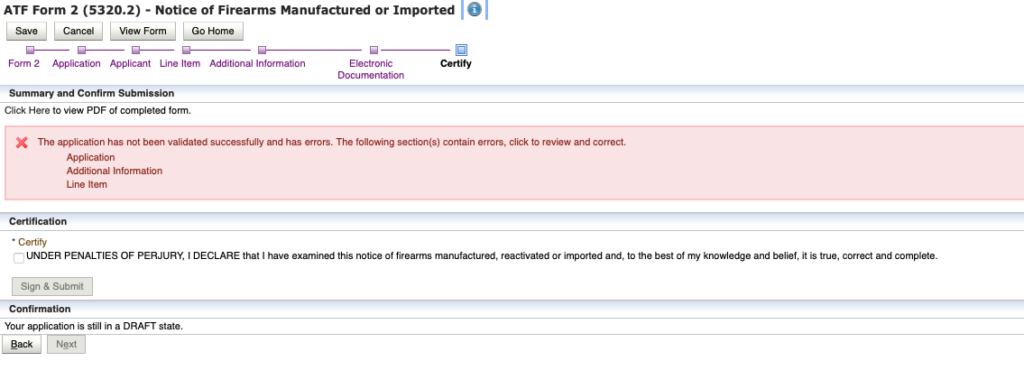
8. In this final step, you will certify your information. The picture below shows an error because no information was entered – yours should NOT show this error. If it does, go fix the errors.
Before finalizing, I recommend clicking on [View Form] to inspect the form for errors.
Click the certification box and then [Sign and Submit].
SAVE a copy of this form for your records to show that you submitted it as required by law (don’t rely on the eForms system to save a record for you).
Paper Form 2 Instructions
For the paper version of the ATF Form 2, you may follow along with the instructions below.
You will make TWO copies of this Form. The original goes to the ATF and the duplicate stays in your records. Sign, date, and complete BOTH copies.

- Type of Notice a. Firearms on this Notice Are: check “manufactured. b. Import Permit Number: write “n/a” c. Permit Expiration Date: write “n/a”
- Name and Address: Include your name and address from your FFL, and include any trade names that are relevant to the NFA firearm manufactured. Also, select the company type.
- Federal Firearm License Number: Enter your Type 07 or Type 10 FFL number.
- Employer Identification Number and Class: Enter your company EIN and SOT Class. e.g. “12-3456789 / Class 2”
- Federal Explosives Permit Number: Unless you are making a Destructive Device (bombs, grenades, etc.), you don’t need this and write “n/a”
- Telephone Number: Add your telephone number
- Type of Destructive Device: If you’re not making a Destructive Device, do NOT check either box and write “n/a” below the boxes. A common mistake is to select “firearm” when a Destructive Device is NOT being made – don’t do this. “Firearm” is NOT for most NFA Firearms…. it is ONLY for a “Destructive Device Firearm.”
- Email Address: Include your business email address (ensure it is monitored!)
- Number of Firearms Covered by this Notice: Enter how many NFA Firearms you’ve made which are going to be included in this Form 2.
- Date of Manufacture, Reactivation, or Release from Customs: Enter the correct date (it should NOT be older than the previous business day).
- Marking Variance Information: If the NFA Firearms are being made under a marking variance, and you are applying another manufacturer’s markings, enter that information here. You MUST have an approved marking variance for this. If this does not apply, enter “n/a”
- Description of Firearms: Enter the relevant details for the NFA Firearms made. Do not guess – enter accurate measurements. If you need to add more than 3 firearms, use an additional sheet. If you do this, note at the bottom of this step that an additional sheet is being used and ensure that the additional sheet is in the same format as the information and that it references this Form 2 (include date and FFL number at a minimum).
- Signature, Name, and Title: Sign the form, print your name, and include your title in the company.
- Filing Date: Enter the date you are filing Form 2.
Paper Submission Instructions
The paper version can be submitted by mail or fax (if you have filed a special affidavit with the ATF – sample draft below the instructions).
You must have TWO copies of this form. One goes to the ATF, the other stays in your records.
- By Mail. The notice shall be filed with the National Firearms Act Division, Bureau of ATF, 244 Needy Road, Martinsburg, WV 25405
- Facsimile Transmission. Form 2 may also be submitted for approval via facsimile transmission (304) 616-4501 provided that the licensee has filed an affidavit with the NFA Division in accordance with ATF Industry Circular 89-6.
Affidavit example for Faxed Form 2
Affidavit for Facsimile Transmittal of NFA Notice or Transfer Application Forms
To: Bureau of ATF
NFA Branch
244 Needy Road, Martinsburg, WV 25405

Affidavit

I, _____________________________________, doing business as ___________________________ _______________________________________ hereby state:

In addition to those applications sent via U.S. mail, I will be filing ATF Forms (2, 3, 5 and/or 9) by facsimile transmission;
The signature appearing on the facsimile copies will be mine and is intended as the original signature;
I will be submitting the facsimile copies as originals for purposes of approval under the provisions of Title 27, Code of Federal Regulations, Part 479, and that the facsimile copies are to be treated as originals; and
I will personally transmit the copies via facsimile machine.
I declare under penalty of perjury under the laws of the United States that the above information is true and correct.


Signature___________________________________________________________________________ Date_______________________________________________________________________________
Name: ____________________________________________________________________________
Title: ______________________________________________________________________________
Trade name: ________________________________________________________________________
Address: ___________________________________________________________________________
Telephone: _________________________________________________________________________
FFL number: ________________________________________________________________________
EIN: _______________________________________________________________________________